Client
Hearify
Role
UI/UX Designer
Industry
Ed-tech
Design system
Token architecture
AI product
EdTech
Web
Design System & AI Flows for EdTech
Hearify is an AI-powered web platform for creating quizzes, tests, and surveys from any material: PDFs, videos, text prompts. Used by teachers, HR teams, and educators. I joined as lead product designer and was responsible for design direction, the design system, and key product flows.
2×
site traffic
after landing redesign, measured via analytics
5→3
min quiz creation
flow redesign cut creation time by 40%
3
designers on system
+ dev team, system built to support the whole team

Context
Hearify is an AI-powered web platform for creating quizzes, tests, and surveys from any material — PDFs, videos, text prompts. Used by teachers, HR teams, and educators. I joined as lead product designer and was responsible for design direction, the design system, and key product flows.
The problem
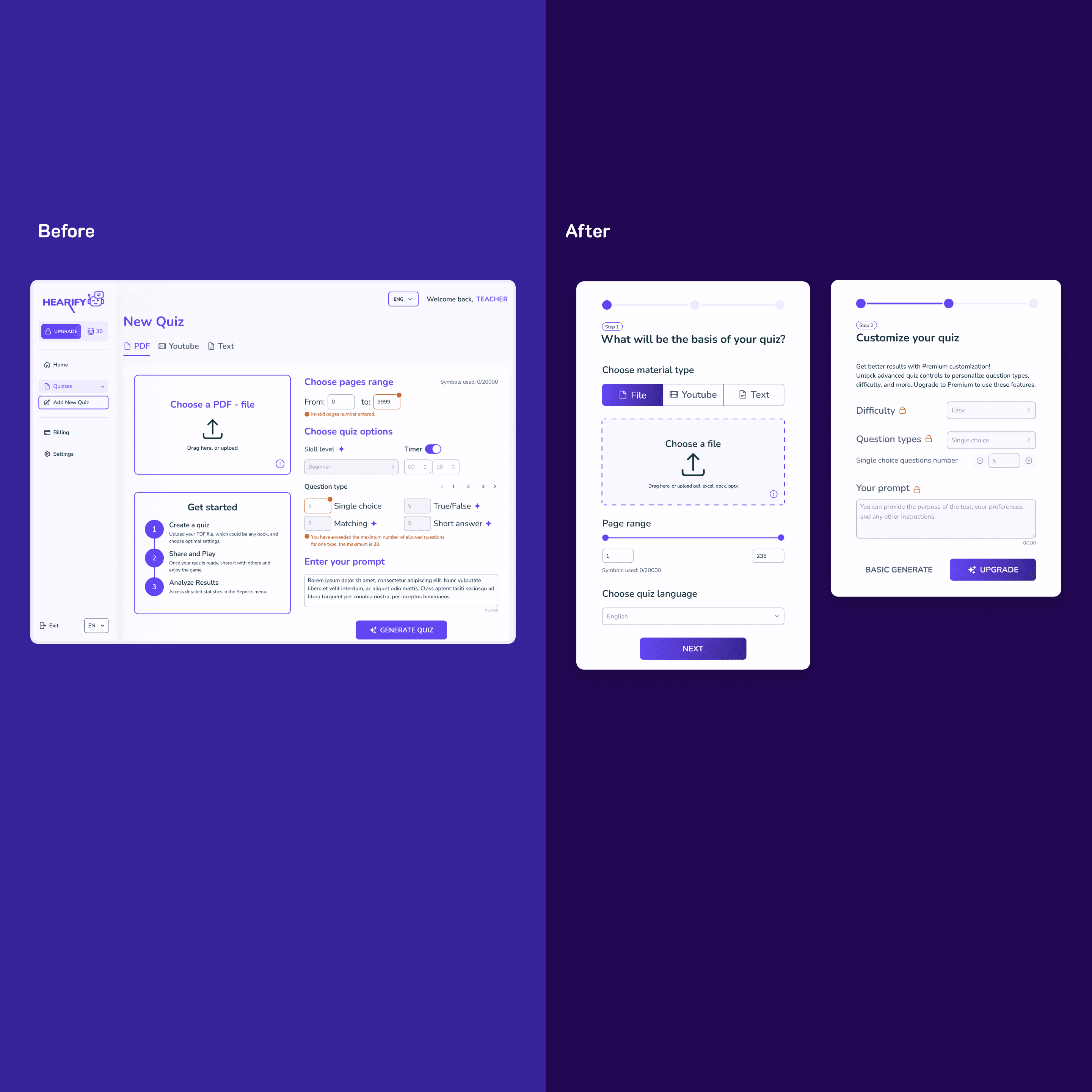
The quiz creation form packed too much onto one screen like material type, page range, quiz options, prompt, and generation all lived together. Users didn't understand what they were doing or why, and conversion to payment was low. What I did 1. Ran hypothesis-driven redesign: built the assumption, designed a solution, tested with users, iterated twice based on Amplitude data, heatmaps, and screen recordings. 2. Split the single form into a stepped flow material type first, then configuration, then generation. Reduced cognitive load at each step. 3. Added clear value signposting at the upgrade moment users now see what Premium unlocks before being asked to pay.
My Role
Led design end-to-end across two main tracks: evolving the design system (token architecture, new components, system adoption across the team) and redesigning core product flows quiz creation, onboarding, and the landing page. Managed and mentored a team of designers throughout.
Process
What I inherited A small existing system components without tokens, no consistent naming, and growing inconsistency as the product scaled. The team was making one-off decisions per feature instead of pulling from a shared library. What I built Introduced color tokens, expanded the component library, and structured the system to support a team of 3 designers and engineering. Components included: buttons, inputs, dropdowns, tabs, toasts, avatars, tooltips, tags, cards, pop-ups, quiz components, flashcard components, scrollbars, files, and background patterns.
The token story: what I learned the hard way.
My first attempt at the color token architecture was thorough granular tokens for every possible use case. In practice, it was too complex for the team to adopt consistently. Designers weren't sure which token to use where, and the system created more friction than it solved. I stepped back, mapped how tokens were actually being used, and simplified to four semantic categories: text, icon, background, and fill. Adoption improved immediately the team could make token decisions without needing to consult documentation every time.